
How to Install IPTV on TiviMate IPTV Player
TiviMate IPTV Player is a powerful Android-based application designed for streaming IPTV channels with professional features. It supports both Remote Playlists and Xtream Codes API systems, making it a popular choice for Firestick users and Android TV devices to stream IPTV content reliably.

In this comprehensive guide, we'll show you how to add IPTV channels to TiviMate using Xtream Codes API. At the end, you'll also learn about key features like Catch-up TV, Recording, EPG (Electronic Program Guide), and Subtitles.
How to Set Up TiviMate IPTV Player via Xtream Codes API
- Step 1: Download the TiviMate app from Google Play Store or your device's app store.
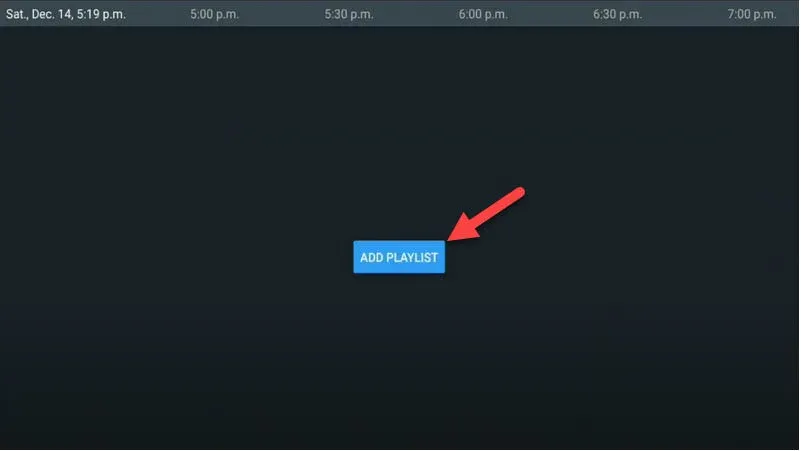
- Step 2: Open the app and click on "Add Playlist" button.
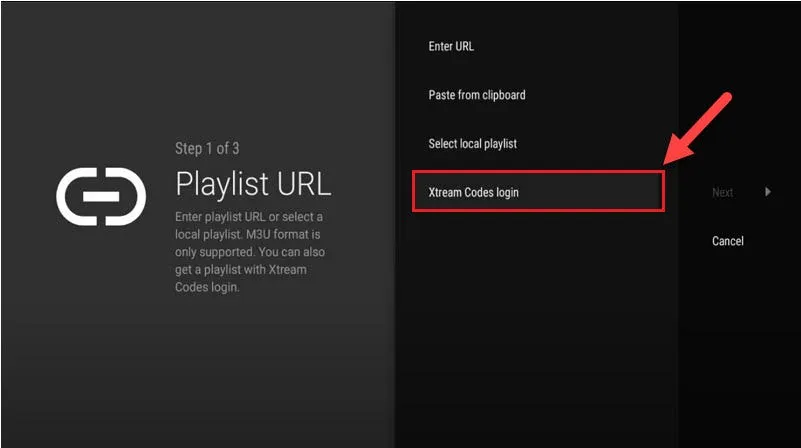
- Step 3: Choose "Xtream Codes Login" option and click "Next".
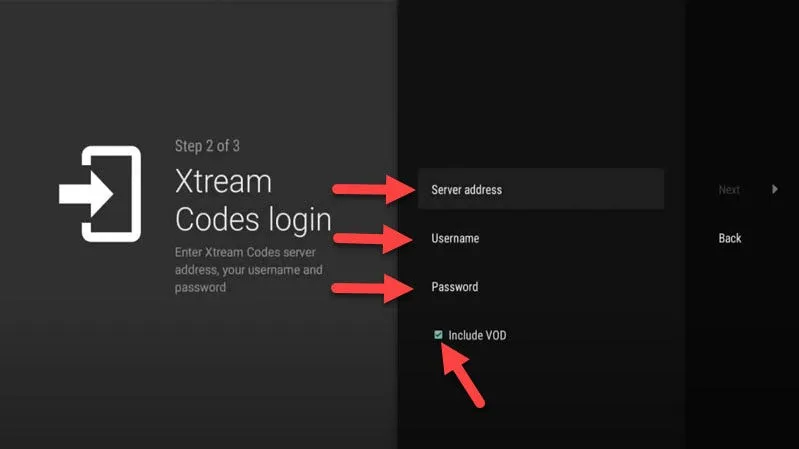
- Step 4: Enter your credentials:
- Server URL: Your IPTV server address (provided by 8kIPTV4U)
- Username: Your 8kIPTV4U account username
- Password: Your 8kIPTV4U account password
- Step 5: (Optional) Check "Include VOD" if you want to access Video on Demand content.
Top Features of TiviMate IPTV Player
- Modern Interface: Optimized for big screens and smooth navigation across all devices
- EPG Support: Electronic Program Guide with automatic loading for channel schedules
- Auto-start on Boot: Automatically launch TiviMate on device startup for convenience
- Favorite Channels: Mark and organize your favorite channels for quick access
- Picture-in-Picture Mode: Watch while navigating the menu simultaneously
- Catch-up TV: Watch previously aired programs within the catchup window
- Recording Functionality: Record live TV for later viewing (Premium feature)
- Subtitle Support: Multi-language subtitle options for accessibility
- Multiple Playlists: Manage multiple IPTV sources simultaneously
How to Use Advanced Features
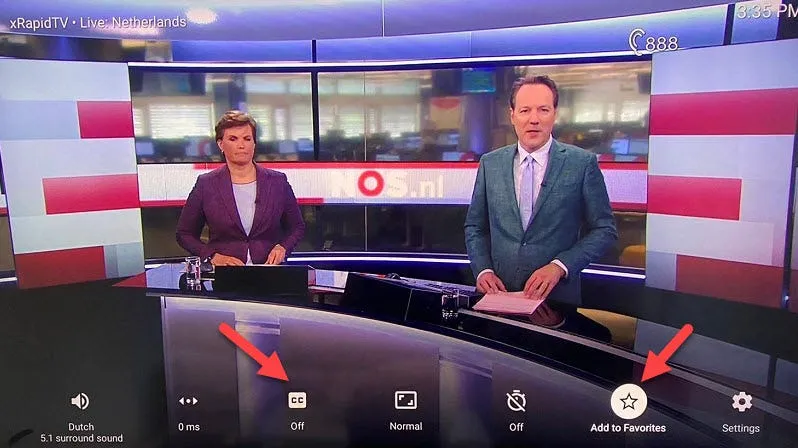
When you open a channel, you'll see the TV Guide with EPG information. To access settings and additional options:
- Hold the OK / Select button on your remote for 2 seconds while watching a channel
- The settings menu will appear with options including:
- Recording settings and scheduled recordings
- Subtitle preferences and language selection
- Add to favorites for easy access
- Playback options and video quality settings
Enjoy your IPTV experience with 8kIPTV4U — fast streaming, smooth playback, and always online support!
If you face any issue during setup or while using TiviMate, contact our support team — we're always available to help you resolve any problems quickly.